Local Paid Search How-To
WRITTEN by: Bill Sterzenbach |
categories:
SEO

Getting Started - What is Local Search
Local paid search refers to 'bidding' on keywords searched by folks in your area. Getting started in paid search is not as hard as you may think. It basically involves the following 4 steps:
- Research Keywords
- Define a Conversion
- Setup a Landing Page
- Setup Paid Search Campaign
Example: Dayton/Springfield Ohio Realtor
Using the Dayton Commercial Real Estate market as a basic example, the campaign we'll outline below will draw around 100 new visitors to your website each month at a cost of less than $200 per month.
Step One - Keyword Research
Keyword research basically involves discovering which phrases are actually being searched in regards to products or services you provide. In our example, you are a realtor. Your job is to discover which phrases people may search to find homes in the area you serve.
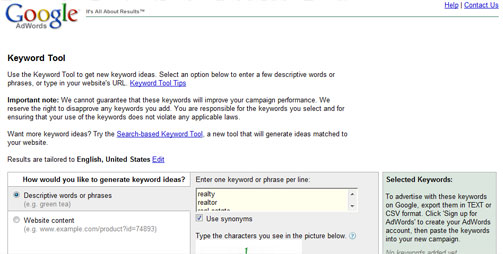
The first step in your keyword research will be to go to Google and find out what phrases are being searched. To do this you will use their keyword tool. This is located HERE. Try searching for broad phrases such as Real Estate, New Home, Realty, etc. Honestly, if you are going to run your campaign locally (and you are in this example) you really can't go too terribly wrong with broad keywords (unless you just get silly with phrases such as 'home').
First enter some phrases that you think may relate to what you do:
Next 'add' the phrases that you determine are relevant and discard the 'misses'
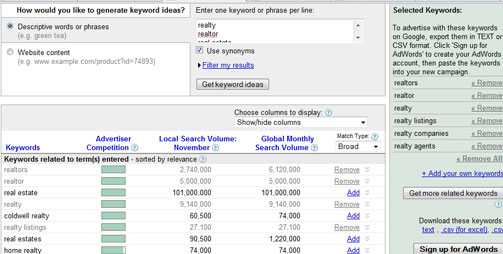
For now, simply save your selected keywords for future use in your online campaigns. You may choose to setup Adwords, Yahoo!, and Bing accounts when you are ready. We do the keywords now because they will help you to choose what the landing page looks like and for what services you will advertise. For example, you may learn things about which of your products or services are in demand based on your keyword research.
Here are the keywords I identified as part of my 'quick & dirty' research:
commercial listings
commercial realty
investors realty
commercial property listings
realty
industrial realty
retail property listings
commercial mls listings
commercial listing service
commercial realty advisors
office space listings
small space home office
commercial lease listings
investment property listings
major realty
commercial realty
commercial listings for sale
commercial realty nj
retail space listings
industrial property listings
commercial foreclosure listings
home office suites
townhouse investment listing
retail realty
realty usa commercial
realty firms
commercial rental listings
Step Two: Define a Conversion
Defining a conversion is fairly simple. You look at what actions could be taken on your website which would lead to a positive interaction with a visitor. Examples might include:
- Visitor completes an online Contact Us form
- Visitor calls your toll-free number
- Visitor requests info on a property
You may need to create a new page on your website to 'capture' leads from your advertising campaigns. This page is commonly referred to as a landing page or 'lander''. In our example we might setup a page with a main heading of 'Affordable Commercial Real Estate in Dayton'. We might choose to use an iconic Dayton image as a visual.
Step Three: Setup a Landing Page
Setting up a landing page is not terribly difficult. You may need to hire a tech person to help, but the most important thing is that you address the keywords for which you bid and that you promote products or services that meet the needs of these searchers. Hint: there should be some element near the center-top of your landing page that visitors can respond to such as a fill-out form. In our example, since we know small business dominates, let's setup an office space promo such as 'Offices Under $800 mo.' as our main promo.
Step Four: Setup Your Local Search Campaign
The final step is to setup your search campaign on Google, Yahoo!, Bing, etc. I won't delve to deeply here, but perhaps in another post we'll talk more indepth about this process. Here are the keys:
Generally speaking, here are some great tips for your FIRST online campaign:
- Advertise locally only
- Advertise during business hours only
- Do NOT advertise on the 'content networks' advertise for search only
- Use your city name in your ad copy. For example 'Office Space in Dayton'. You don't need to mention Ohio because we're geo-targeting our ads to show only to folks in the Dayton area. The word 'Dayton' in the ad only confirms to the visitor that they are looking at the right ad for their need.
Best of luck with your advertising! If you're interested in giving this a try, I generally get quite a few Google Adwords Vouchers that I can give away to get you started - making this exercise even easier. They usually get me the vouchers in the first couple of months of the year, so let me know if you'd like to be on the list of recipients when (and if) I receive them.
Wrapping it Up
This might all seem like a bit much, and perhaps it is. The key is getting started. Give it a try, devote half a day to setting up your keywords and defining a conversion. Remember, these ads WILL bring you new visitors - many of which may have not even heard of your business before, so it's worth the effort.


